
Tax Notice Case Management: Cases, Notices & Clients
See how tax notice case management works in TaxNotice.ai: one case links the notice, the client record, the owner, the deadline, and the audit trail.
Last updated 2026-06-24
Good tax notice case management starts with a clean relationship: one Case ties the IRS notice your firm received to the Client it belongs to, the owner responsible for the work, and the deadline that drives the response. That sounds simple, but it is what keeps notice work from turning into scattered emails, duplicate data entry, and missed follow-ups.
What it is
- A Notice is the tax agency document your firm needs to act on. It carries the notice code, tax year or period, amount, date, and any supporting source details that matter to the response.
- A Client is the reusable taxpayer record your firm keeps over time. It holds the identity, contact, partner ownership, POA status, and other details that more than one notice may need.
- A Case is the working record that turns one reviewed notice into controlled work. It links the original notice to the right client, assigns the work to a real owner, keeps the due date visible, and gives the firm one place to review evidence, drafts, delivery, follow-up, and history.
In the standard path, one reviewed notice becomes one case. A client may have many cases over time, but each case keeps its own original notice, due date, and case record so later client edits do not rewrite what your firm acted on.
Why it matters
When these three records stay connected, your firm gets the operational basics right:
- The right notice stays tied to the right taxpayer.
- The owner and reviewing partner are visible from the start.
- The response deadline and urgency stay attached to the work itself.
- Historical facts remain reviewable even if the client record changes later.
- The audit trail answers what came in, who took ownership, and what happened next.
That is the difference between a tax notice living in somebody's inbox and a tax notice becoming controlled firm work.
How it works in TaxNotice.ai
After intake review, TaxNotice.ai creates the case from verified notice facts and the selected client record. The Overview tab then becomes the safest orientation point: it shows the case status, the deadline and amount, the client and POA status, the owner and partner, and the handoff from the original intake and original notice into the case workspace.
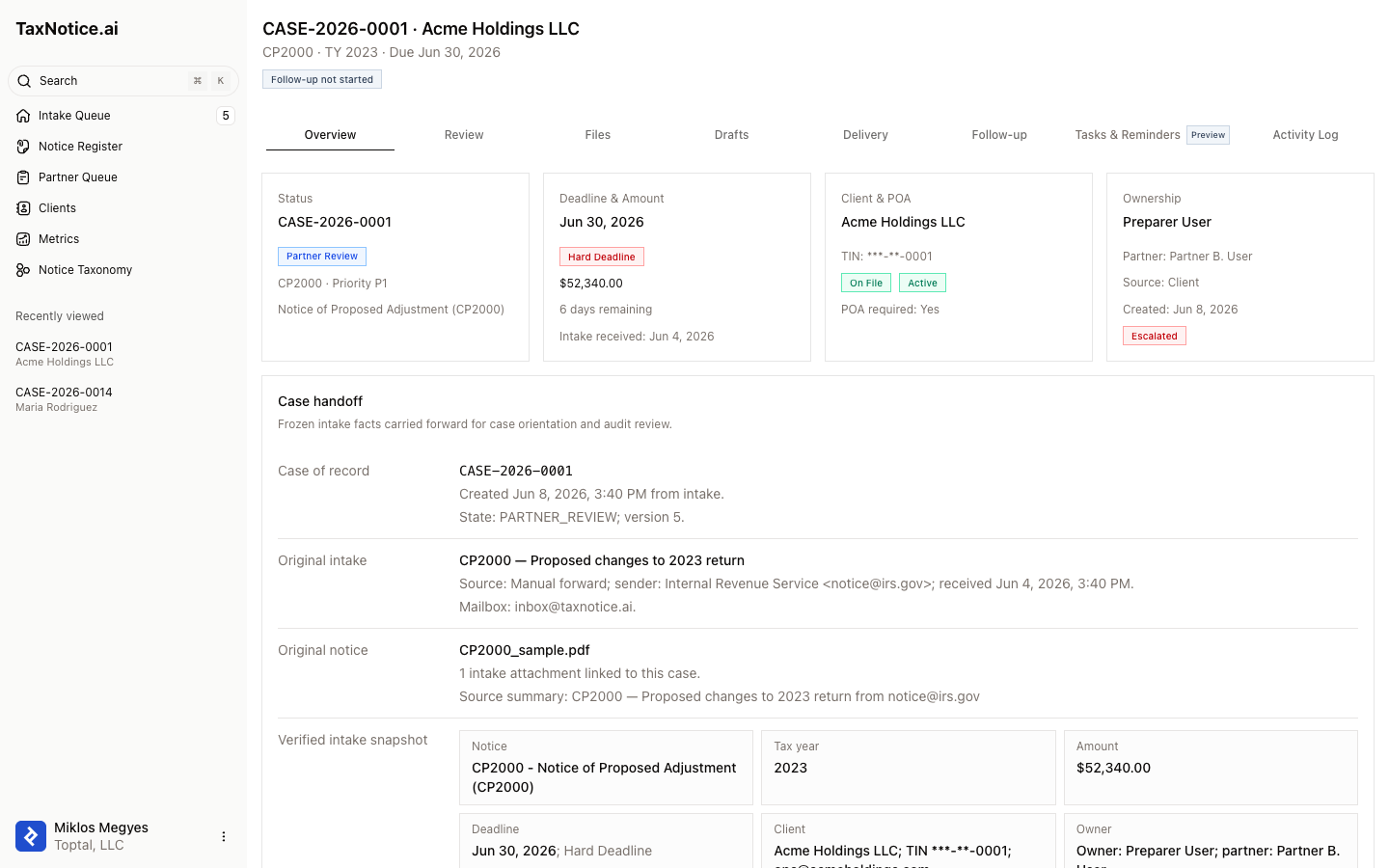
In practice, that means your firm does not have to guess which facts came from the notice, which details came from the client record, or who owns the next action. The case keeps those relationships visible across the tabs your team uses next: Files, Drafts, Delivery, Follow-up, Tasks & Reminders, and Activity Log.
The Activity Log tab is the case's read-only chronology. It combines the status changes and case actions your team needs to review in one list, with the actor, target, source, and plain-language details where the source record supports them. Partners and Case Administrators can use Export CSV from that tab when they need a case-scoped file for review, compliance, or offline analysis. That export covers only the open case's activity rows and records the export on the case; the separate Metrics export covers filtered reporting rows across cases.
Related
- Create a case from intake
- Maintain client records
- Understand the evidence checklist
- Follow the full notice lifecycle
See your notice work in one place
TaxNotice.ai is opening to a small group of founding firms before launch. Request founding firm access to run your notice work this way.