Run a tax notice evidence request
Learn how to run a tax notice evidence request in TaxNotice.ai: review the checklist, request missing documents, record verified locators, and unlock drafting.
Last updated 2026-06-24
A tax notice evidence request works best when you ask only for the items the case still lacks. In TaxNotice.ai, the Files tab keeps the checklist, the POA blocker, the client contact details, and the draft gate in one place so your firm can verify facts, request documents, and move the case to drafting without pulling client evidence into the app.
Before you start
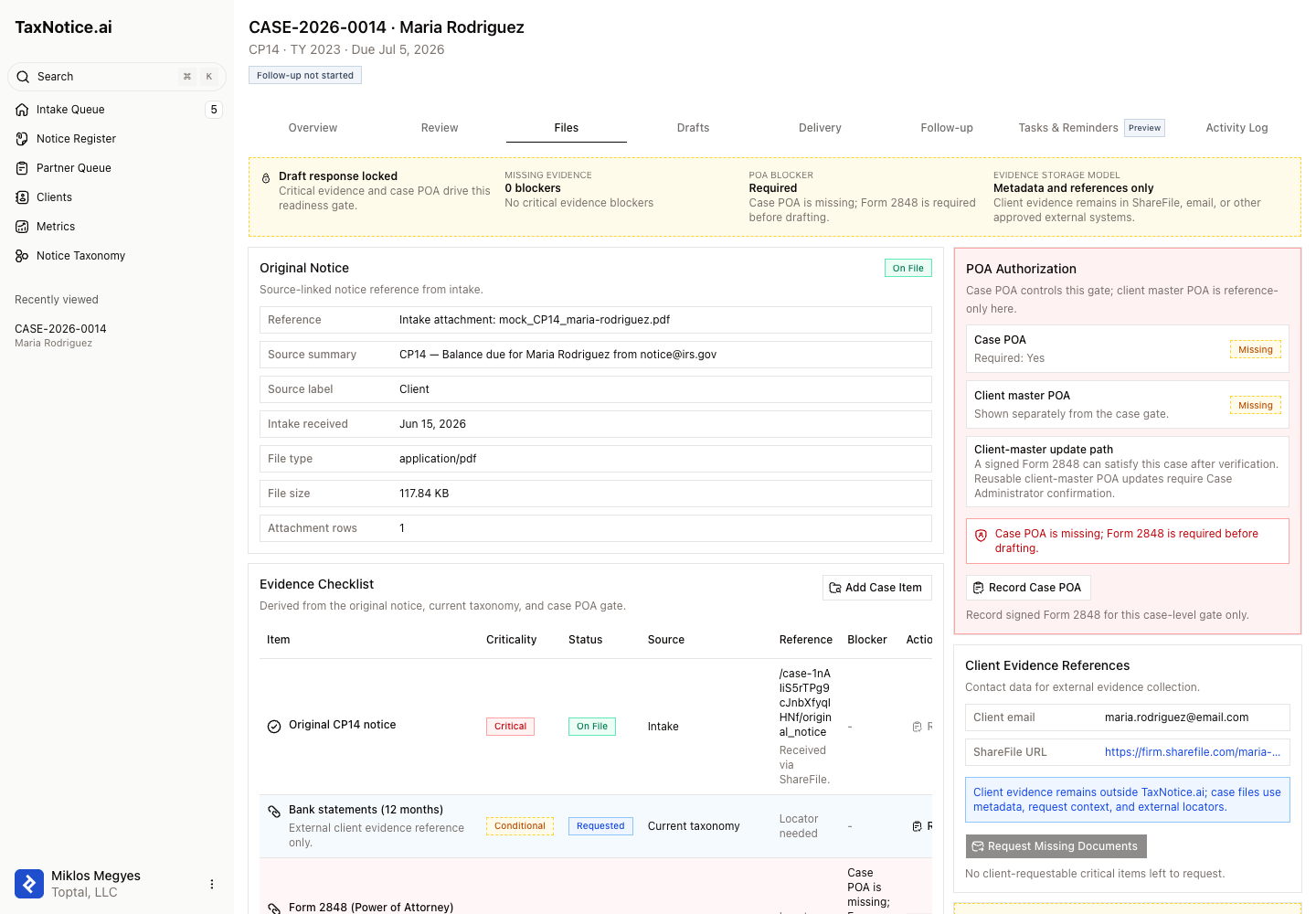
Evidence gathering is a Case Preparer task. Open the case, then switch to Files. This tab is where you'll see the Draft response locked or Draft response gate ready ribbon, the Evidence Checklist, POA Authorization, Client Evidence References, and the Draft Response Gate.
Evidence stays outside the app
TaxNotice.ai tracks checklist status, request history, and external locators. Your firm still verifies the actual file in ShareFile, email, or another approved system before you mark it received.
Steps
Open Files and read the draft gate
Start with the summary ribbon at the top of the tab. It tells you whether the case is Draft response locked or Draft response gate ready, how many Missing evidence blockers remain, whether there is a POA blocker, and the app's Evidence storage model. When the gate is locked, TaxNotice.ai spells out the exact blockers instead of leaving readiness to guesswork.
Work the Evidence Checklist first
Review each row in Evidence Checklist. The live statuses are On File, Requested, Missing Reference, Blocked, Conditional, and Not Required. Use the Criticality and Blocker columns to separate true drafting blockers from conditional or optional items. Start by marking anything your firm already has outside the app, then leave the still-missing items visible so the request only asks for what the client still owes.
Record what you already have
For a missing or requested item, use Record after you verify the evidence outside TaxNotice.ai. The Record Evidence Receipt dialog asks for an External locator and an optional Receipt note. That locator can be a ShareFile path, a filename, or another firm reference that lets a reviewer find the evidence again later. Once you save it, the item moves out of the blocker list and can appear under Received Evidence.
Check POA Authorization and client contact data
Before you send anything, confirm the right-side panels. POA Authorization separates Case POA from Client master POA and shows when Form 2848 is still blocking drafting. Then review Client Evidence References for the Client email and ShareFile URL the request will use. If either is wrong or missing, fix that first so the request goes to the right place.
Send Request Missing Documents
When client-requestable critical items remain, select Request Missing Documents. The request composer shows the Recipient email, ShareFile URL, the checked Requested missing items, and Include Form 2848 when POA is still blocking the case. Add the Message to client, then create the request. If the action is disabled, read the blockers shown in the panel. TaxNotice.ai can name both permission blockers, such as needing Case Preparer access, and prerequisite blockers, such as a missing client email or ShareFile URL. TaxNotice.ai keeps the latest send in Latest Request and preserves earlier attempts in Request History as an append-only record.
Hand the case forward when the gate turns ready
Keep working the checklist until Missing evidence drops to 0 blockers and the POA blocker reads None. At that point the ribbon changes to Draft response gate ready and Draft Response becomes the next step. That's the clean handoff from evidence work into drafting.
What happens next
Once the evidence blockers are cleared and the case POA gate is satisfied, you move straight into Draft a response package. For the deeper product rules behind this tab, see Evidence checklist and Power of attorney.
FAQ
Does TaxNotice.ai store the client's evidence files? No. The app's own label is Metadata and references only. Your firm keeps the evidence in ShareFile, email, or another approved external system, and TaxNotice.ai stores the locator, request context, and blocker status.
What is the difference between Case POA and Client master POA? Case POA controls whether this case can move into drafting. Client master POA is reference data for future work. A signed Form 2848 can satisfy the current case first, and a Case Administrator can later confirm the client-master update.
Why is Draft Response still locked? Read the Draft Response Gate panel. It lists the exact missing critical evidence and any POA blocker, such as a missing external locator or an unsigned Form 2848. The button only opens once those blockers are gone.
Why is Request Missing Documents disabled? The Files tab names the reason. A Case Preparer may need to send the request, and the case also needs usable client contact details before any request can be recorded.