Review IRS notice taxonomy templates
Review IRS notice taxonomy templates in TaxNotice.ai: confirm supported notice codes, deadline rules, severity, firm overlays, and drafting inputs.
Last updated 2026-06-24
IRS notice taxonomy templates in TaxNotice.ai give your firm one controlled place to confirm which notices are supported, how severity and deadline rules behave, and whether drafting should rely on a firm overlay or a core change request. This is where you verify the reusable notice rules before a team member trusts the next triage step or starts a response package.
Before you start
Open Notice Taxonomy from the left navigation. The page is the firm's supported-notice reference: it lists the platform notice inventory, lets you open a notice's full rule set, and gives Case Administrators the controls to maintain firm overlays or request a core taxonomy correction.
Taxonomy sets the rules; your firm still decides the response
TaxNotice.ai can use the taxonomy to classify notices, surface deadlines, and narrow drafting choices. Your firm still reviews the facts, decides the tax position, and approves the final response.
Steps
Open the supported notice inventory
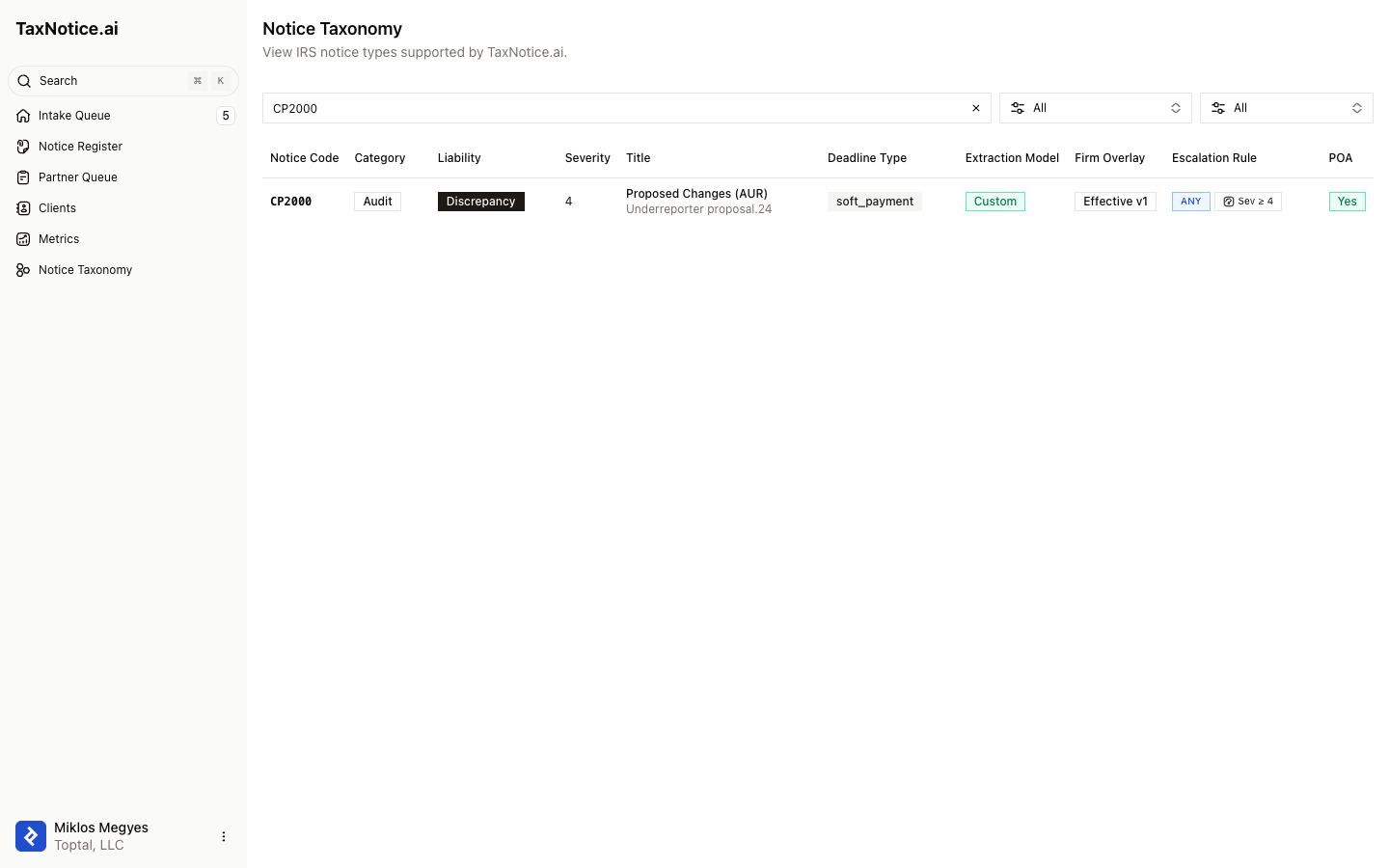
In the app shell, choose Notice Taxonomy. The page header reads View IRS notice types supported by TaxNotice.ai. The table is the operating reference your team uses before relying on a notice in intake, case setup, or drafting.
Search and filter to the notice you need
Use the search box - Search by notice code, title, or description... - to find a notice quickly. Narrow the list with the All Categories and All Severity filters. The table gives you the scan view: Notice Code, Category, Liability, Severity, Title, Deadline Type, Extraction Model, Firm Overlay, POA, and Escalation Rule.
Open the notice and review the rule set
Click the notice row to open its detail page. Review the rule fields that downstream work depends on: Fields to Extract, Required Documents, POA Required, Deadline Type, Response Deadline Logic, Recommended Action, Predicted Next Notice, and Escalation Rule, plus the source links. This is the safest place to confirm that the notice will classify and route the way your firm expects.
Save a firm overlay when your firm needs local labels
If your firm needs its own label or reporting layer, choose Edit firm overlay. The current overlay summary shows Custom Label, Office Group, Reporting Category, and Internal Tags. Simple label cleanup can be saved with Save label; metadata changes that affect office grouping or reporting go through Submit metadata review so they can be reviewed before they become effective.
Request a core taxonomy change instead of editing platform rules
When the supported notice itself is missing or wrong, do not rewrite the platform entry in place. From the list, use Request missing notice. From a notice detail page, use Request core change. The request form asks for Request type, Field, Current value, Requested change, Rationale, and Source URL, so the firm can document exactly what should change.
Use the taxonomy check before triage and drafting
Before a preparer relies on a notice, confirm the row's severity, deadline logic, POA rule, and overlay status here. That review supports the work that happens later in intake and drafting: the taxonomy tells the product how to classify the notice, and the case workspace later applies the approved letter templates and supported PDF forms for that case.
What happens next
Notice Taxonomy does not move a case by itself. It keeps the reusable notice rules accurate so the next operational screens can trust them. After you confirm a notice or submit a change request, return to the workflow that consumes those rules: Triage incoming notices, Draft an IRS notice response, and the concepts behind Deadlines and triage.
FAQ
Can I edit a supported notice directly? Not the platform rule set. Use Request core change or Request missing notice when the supported notice itself is wrong or absent. Use a firm overlay only for firm-local labels and reporting fields.
What belongs in a firm overlay? The current UI supports Custom Label, Internal Tags, Office Group, and Internal Reporting Category. Those fields help your firm name, group, and report on work without changing the core notice definition.
Why would a firm overlay show Pending review? A Case Administrator has submitted overlay metadata that is not effective yet. The detail page keeps that status visible so the firm knows the change is still awaiting review.
Where do templates and forms show up? The taxonomy page confirms that a notice is supported and that its deadline, escalation, and POA logic are correct. The actual letter-template choice and the supported IRS form work happen later in the case's Drafts workspace. If POA is part of the rule set, the same requirement is explained in Power of Attorney.