IRS notice response deadlines and triage
IRS notice response deadlines stay visible in TaxNotice.ai with notice dates, response dates, priority, owners, and follow-up signals in one view.
Last updated 2026-06-24
IRS notice response deadlines are easy to lose when work is spread across email, calendars, and memory. TaxNotice.ai turns each notice into one visible record with a deadline, a priority, an owner, and an audit trail, so urgent response work stands out before a window closes.
What it is
Deadline triage is the discipline of deciding three things as soon as a notice arrives: what kind of deadline it carries, how urgent it is, and who owns the next move. Some notices create hard response dates. Some create softer payment or reply windows. Some move into follow-up monitoring after the response is sent. TaxNotice.ai keeps those categories separate so your team can see what must be answered now, what can be monitored, and what still needs review.
TaxNotice.ai does not guess past missing facts. If the notice date is missing or unclear, the item stays in review until a person verifies it. The software can calculate and suggest; your firm confirms the facts and decides the response.
Why it matters
The risk in notice work is rarely one dramatic miss. It is the quiet drift: a CP2000 that sits too long, a Letter 531 court deadline treated like an ordinary reminder, or a balance-due notice that has no clear owner. Deadline triage protects response work by making urgency visible early, before a notice turns into a delivery, follow-up, or escalation problem.
That is why TaxNotice.ai keeps related signals separate instead of collapsing them into one status:
- deadline type
- priority
- escalation
- owner
- follow-up status
A notice can be high priority and still be blocked for review. It can be escalated and still need a verified notice date. It can be delivered and still require follow-up monitoring. Keeping those signals visible in one place makes the handoff from intake to active case work much less fragile.
How it works in TaxNotice.ai
In the Intake Queue, your team verifies the notice code, notice date, client, and other required fields before the notice becomes case-ready. TaxNotice.ai then carries that deadline context into the Notice Register, where case-linked notices stay visible across the firm.
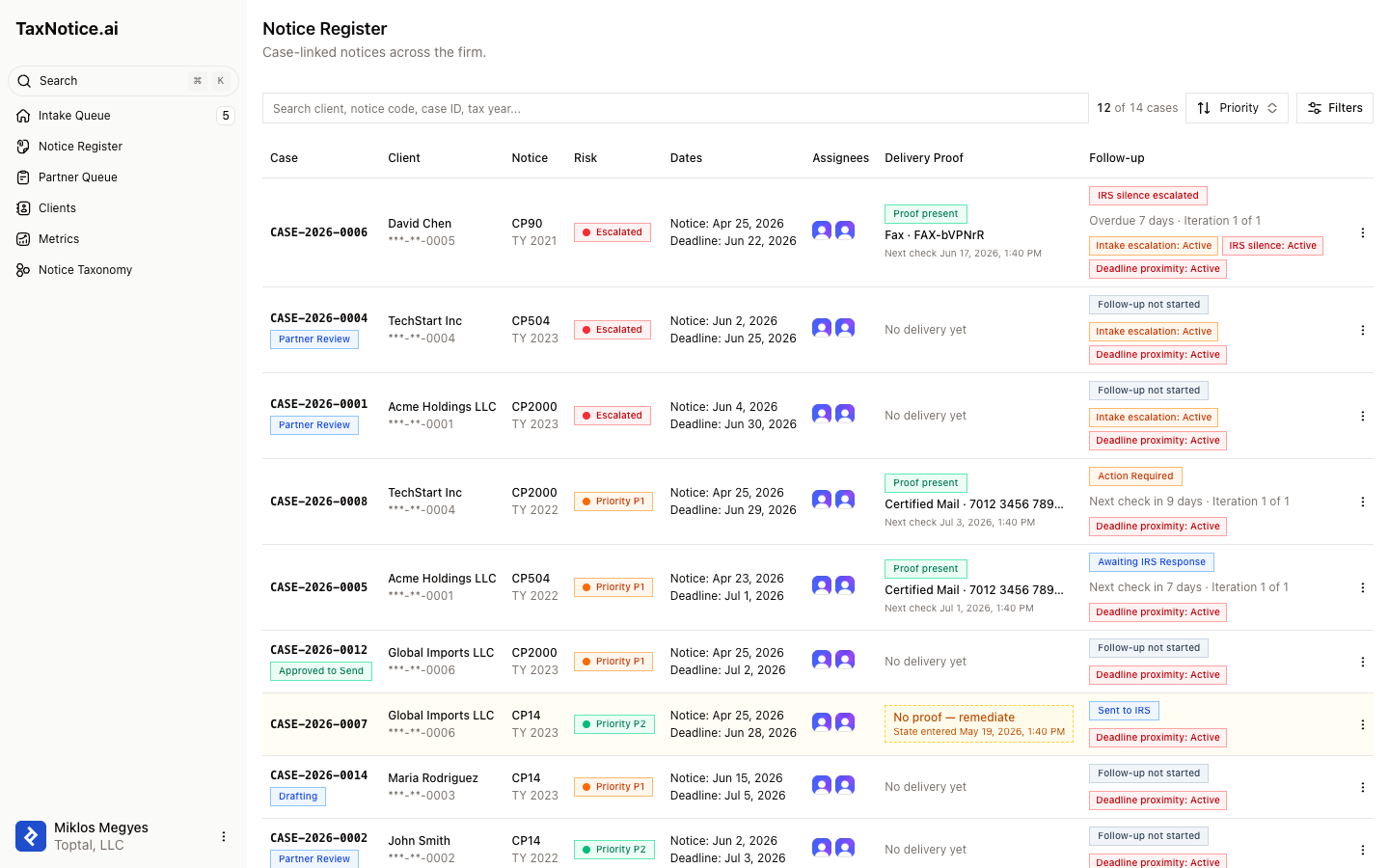
In the Notice Register, each row shows the pieces that matter under pressure: the case number,
client, notice code, risk signal, notice date, deadline, assignees, delivery proof, and follow-up
state. Colored risk dots show priority, an Escalated badge flags notices that crossed a threshold,
and follow-up badges call out separate signals such as Deadline proximity: Active, Intake escalation: Active, IRS silence, Risk checkpoint, or Suspended. Anyone scanning the register
can tell which notice is approaching its response date, who owns it, and what stage comes next.
The deadline logic comes from your Notice Taxonomy. For example, supported notices in TaxNotice.ai include ordinary administrative windows such as CP2000's 30-day response period and stricter deadlines such as Letter 531's 90-day petition window. The point is not to ask staff to memorize every rule. It is to make the right rule visible on the notice and keep it tied to the case.
Related
- Triage an incoming notice
- Manage notice taxonomy and templates
- Follow the full notice lifecycle
- See every case status
See your notice deadlines in one register
TaxNotice.ai is opening to a small group of founding firms before launch. Request founding firm access to see notice deadlines, owners, and follow-up work in one place.