Draft an IRS notice response
Learn how to draft an IRS notice response in TaxNotice.ai: choose the package shape, confirm prefilled facts, and submit the package for partner review.
Last updated 2026-06-24
To draft an IRS notice response in TaxNotice.ai, you open the case's Drafts tab, choose the package shape, and turn verified case facts into a reviewable response package. Templates and prefilled fields save time, but your firm still decides the facts, the tone, and the tax position before anything goes to a partner.
Before you start
Drafting is the Case Preparer's job. Open the case workspace and choose Drafts in the top tab bar. This tab keeps the readiness gate, the working draft, the package preview, and the version history together in one place.
Drafting opens only when the gate is ready
The document checklist must be complete and any required Power of Attorney (Form 2848) must be satisfied before Start Drafting is available. If the tab shows a locked gate, finish gathering evidence and clear the authorization blocker first. The underlying rule is the same one described in Power of Attorney.
Steps
Open Drafts and start the working package
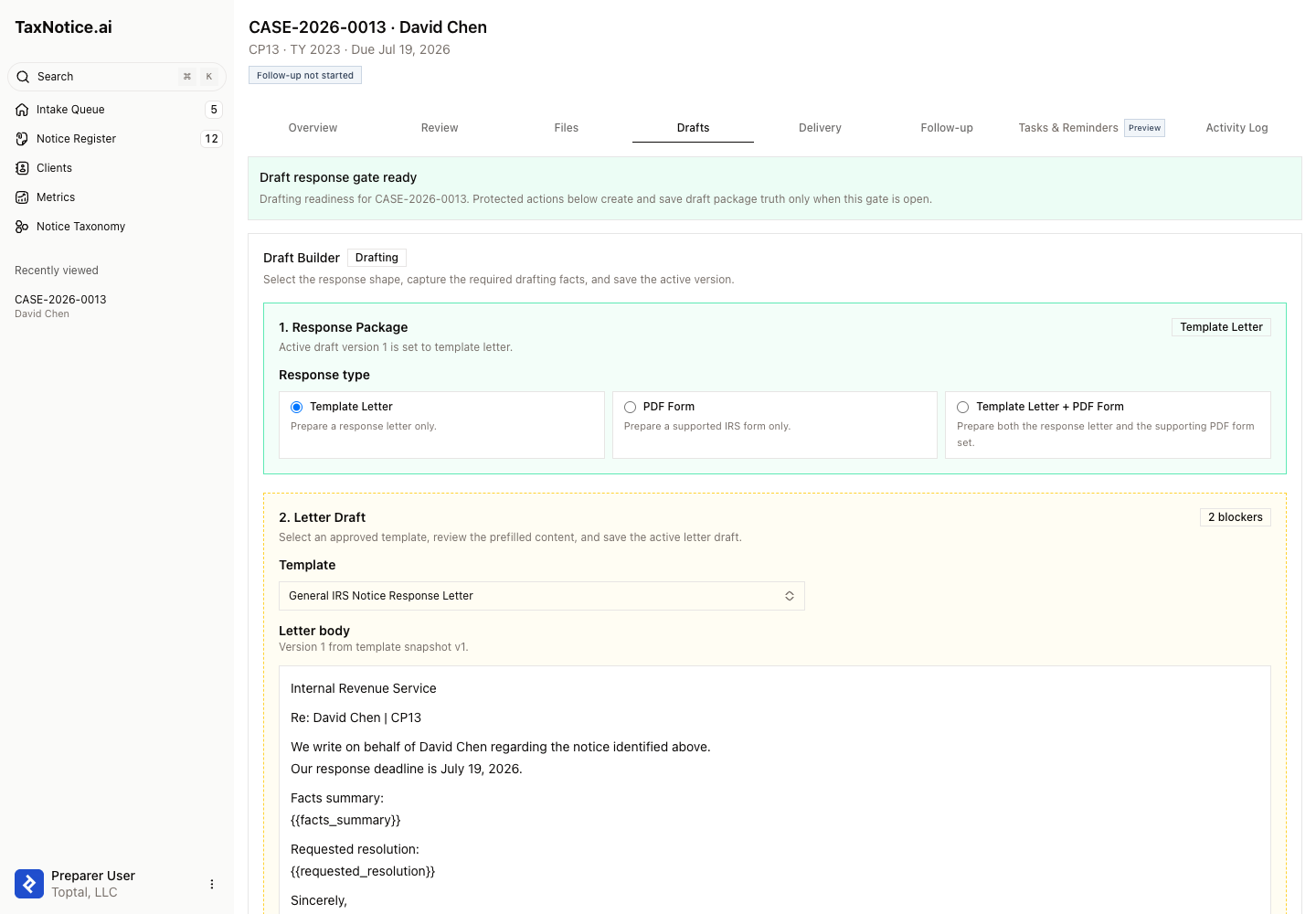
Open Drafts. When the case is ready, the banner reads Draft response gate ready and the Start Drafting card is active. If the case is not ready, the tab stays locked and names the blockers. Click Start Drafting to create the working draft package for this case.
Choose the response package shape
In Draft Builder, step 1. Response Package, choose Template Letter, PDF Form, or Template Letter + PDF Form. Pick the package that fits the notice and your firm's approach. TaxNotice.ai can prefill verified facts and keep the sequence controlled, but it does not choose the response strategy for you.
Select a template and write the letter
If the package includes a letter, move to 2. Letter Draft and choose an approved Letter template. The editor loads the template snapshot into Letter body with verified case facts merged in. Review every merged value, resolve any Named blockers, and edit the language with your firm's judgment before you click Save Draft.
Finish any PDF forms
If the package includes forms, use PDF Forms to select the supported IRS forms for this case. For prefill-supported forms, click Download Prefilled PDF. When the final PDF is completed outside the browser, click Mark Prepared Offline and record the ShareFile path or link so the reviewer can inspect the finished form.
Review the preview and version history
Use Package Preview to confirm the case, client, TIN, notice, tax year, package shape, and current draft version before you submit. If you need the original notice while drafting, the preview points you back to the Files tab. Then check Version History, which lists each saved version with its shape, status, blockers, and timestamps so you know which version is still active.
Submit the package for partner review
In Partner Review Submission, work through the server-side checklist. Submission stays blocked until the active draft version is editable, the reviewing partner is assigned, required letter placeholders are resolved, and any selected PDF forms are prepared. Click Submit for Partner Review, add an optional Note to partner, and finish with Confirm Submit. When the gate is locked, the submission and revision controls stay disabled even if a stale browser tab still shows an old draft.
What happens next
Submitting locks the active draft version and moves the case into Partner Review. The partner reviews the exact submitted snapshot, not a moving draft, and the handoff stays visible in the case record through Submitted Version and Version History. From here, continue to Partner review & approval. For the broader package model behind this screen, see Response packages.
FAQ
Why is Start Drafting disabled? The drafting gate is still locked. The tab will name the blocker directly, usually an incomplete evidence checklist or a required POA that is still missing.
Can I submit a PDF-only package? Yes. Choose PDF Form in Response Package, select at least one form, and finish the PDF preparation steps. A letter is only required when the package shape includes one.
Why can't I submit or revise from this Drafts tab? The active draft must still be the editable version for this case. If the case has moved into review, approval, delivery, closeout, or another locked state, TaxNotice.ai keeps the action disabled and names the current blocker.
Why can't I open the original notice from Package Preview? The Drafts preview is read-only and does not expose the direct notice attachment. Use the Files tab when you need the original notice while drafting.
Does TaxNotice.ai decide what the response should say? No. It applies approved templates and verified case data, but your firm still decides the facts, the tax position, and the final response that goes to the IRS.
See the drafting workflow on your own cases
TaxNotice.ai is opening to a small group of founding firms before launch. Request founding firm access to see your notice drafting work laid out this way.