
Use the IRS notice reporting dashboard
Use the IRS notice reporting dashboard in TaxNotice.ai to review operational risk, filter case lists, drill into cases, and export CSVs with audit context.
Last updated 2026-07-12
To use the IRS notice reporting dashboard in TaxNotice.ai, open Metrics from the sidebar and review the firm's active notice work from the current reporting projection. The dashboard helps your firm find deadline risk, intake escalations, IRS silence, risk checkpoints, and taxpayer-action pauses without opening every case first. It shows the work; your firm decides which cases need action.
Before you start
Partners and Case Administrators use Metrics for firm-wide oversight and reporting. Case Preparers start from their assigned work by default, but can browse ordinary firm context. CSV export authority is narrower: Partners and Case Administrators can export the filtered Metrics case list and case Activity Logs; Case Preparers do not receive export authority by default.
Reporting does not move a case
Viewing a metric, opening a drilldown, or exporting a CSV does not change case status. When a row needs work, open the case and use the workflow tab that owns that action, such as Evidence, Drafts, Delivery, or Follow-up.
Steps
Open Metrics
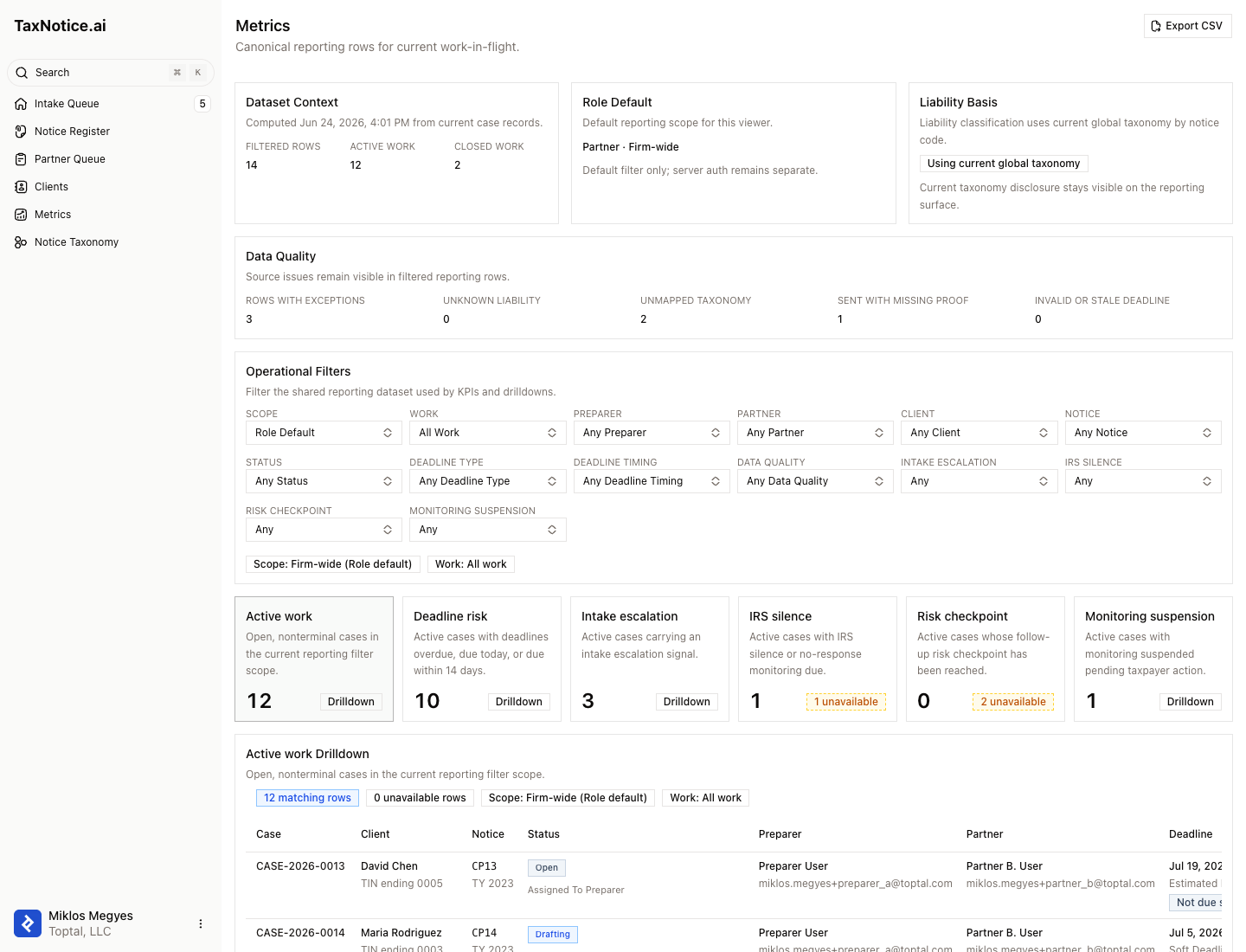
Open Metrics from the sidebar. The page shows the reporting update time, the role default applied to your view, the liability vocabulary used by the projection, and any data-quality exceptions that affect the rows.
Confirm the scope
Use Role default, Firm-wide, or Assigned to me to choose the reporting scope. Use All work, Active only, or Closed only to decide whether the case list includes closed cases. Partners and Case Administrators default to firm-wide; Case Preparers default to assigned work.
Read the operational-risk KPIs
The first dashboard vertical shows six KPI cards: Active work, Deadline risk, Intake escalation, IRS silence, Risk checkpoint, and Monitoring suspension. When the Work filter is set to Closed only, the dashboard also exposes Closed cases with outcome and cycle-duration context. Each count is calculated from the same filtered reporting rows that feed the drilldown table.
Review liability exposure
Read the six liability-exposure cards for Actual Debt, Proposed Liability or Adjustment, Contested Amount, Informational, Refund, Credit, or Overpayment, and Unknown or Needs Classification. The cards total human-verified amounts from active cases. Categories stay separate, so proposed, contested, refund, and informational amounts never net against Actual Debt. Cases without a verified amount remain visible through data-quality cues without inflating a dollar total.
Filter the case list
Refine the dashboard by preparer, partner, client, notice code, status, deadline type, deadline timing, data-quality state, and follow-up signals such as IRS silence or monitoring suspension. The visible KPIs, drilldown rows, and export row count recompute from the selected filters.
Drill into the cases behind a metric
Click a KPI card to open its matching case list. The drilldown keeps the selected metric context visible and shows the case number, client, notice code, status, preparer, partner, deadline, verified amount, liability category, metric reason, and data-quality exception codes where they apply. For Closed cases, the drilldown shows closed reporting context such as outcome, closed date, cycle duration, and final summary disposition when available.
Open the case that needs action
Use the case number link from the drilldown to open the canonical case workspace. From there, work in the tab that owns the next step. For example, missing documents belong in evidence gathering, delivery proof belongs in Delivery, and IRS response monitoring belongs in Follow up and closeout.
Export the filtered case list
If your role can export, the header shows Export CSV for the Metrics case-list report. The button exports all filtered rows, not just the visible page. The CSV includes report type, generated timestamp, dataset timestamp, selected filters, selected metric, row count, taxonomy and data-quality disclosures, and the reporting column schema. TaxNotice.ai records the export as a report-level audit event for the firm.
Use Activity Log CSV for one case
When you need the chronology behind one case, open that case's Activity Log tab and use its own Export CSV control. That file is case-scoped: it exports the activity rows for the open case and records an activity-log export event. Use Metrics export for filtered reporting rows; use Activity Log export for the audit history of one case.
What happens next
The dashboard gives Partners and Case Administrators a controlled way to answer "what needs attention now?" without losing the link back to the case record. Case work still happens in the case workspace. Metrics CSV exports are scoped to filtered case-list rows, while Activity Log CSV exports are scoped to one case's chronology. For role boundaries, see Roles at a glance. For the object model behind each row, see Cases, notices, and clients.
FAQ
Why is Export CSV missing? Your role probably does not have reporting export authority. Partners and Case Administrators can export the filtered case list by default; Case Preparers cannot.
Does a dashboard count ever change a case? No. Metrics is a visibility and reporting surface. Changing case status, sending a request, logging proof, or closing a case happens only inside the case workflow that owns that action.
What should I do when a row has a data-quality exception? Treat it as a work cue. Common exceptions include unknown liability, unmapped taxonomy, missing delivery proof, or stale deadline data. Open the case or the owning settings surface and correct the source record before relying on the affected total.
Why are proposed or contested amounts separate from Actual Debt? They represent different tax positions. Metrics preserves each liability category so leadership can review assessed debt without silently netting it against amounts that are proposed, disputed, informational, or owed back to the taxpayer.
What is in the CSV export? The Metrics export contains filtered case-list rows and metadata needed to reconstruct the report scope, including the selected metric when you exported from a drilldown such as Closed cases. A case Activity Log export contains that case's chronology. Neither export includes case files, evidence documents, raw payload JSON, or full taxpayer identifiers.
See your active notice work before it becomes a deadline problem
TaxNotice.ai is opening to a small group of founding firms before launch. Request founding firm access to review your firm's notice workload this way.