
Create a tax notice case from intake
Create a tax notice case from a reviewed intake: confirm the client, assignees, and deadline handoff before the case opens.
Last updated 2026-06-24
When you're ready to create a tax notice case, TaxNotice.ai starts with the intake your team already reviewed. The final handoff keeps the verified notice facts, matched client, owner, and reviewing partner together so the case opens with the right deadline and the next work already in place.
Before you start
Creating the case is a Case Administrator task. Open Intake Queue from the main navigation, then open an intake that has already been reviewed in Triage incoming notices.
The intake has to be ready first
Create Case stays blocked until the intake review is complete. In the current app, missing client linkage, a missing owner preparer, or a missing reviewing partner all keep the handoff from moving forward.
Steps
Open the ready intake
In Intake Queue, open the notice your team already reviewed. The intake sheet keeps the original notice, the Source email, the classification details, and any Case creation blockers in one place, so you can confirm the handoff before you create anything new.
Start Create Case
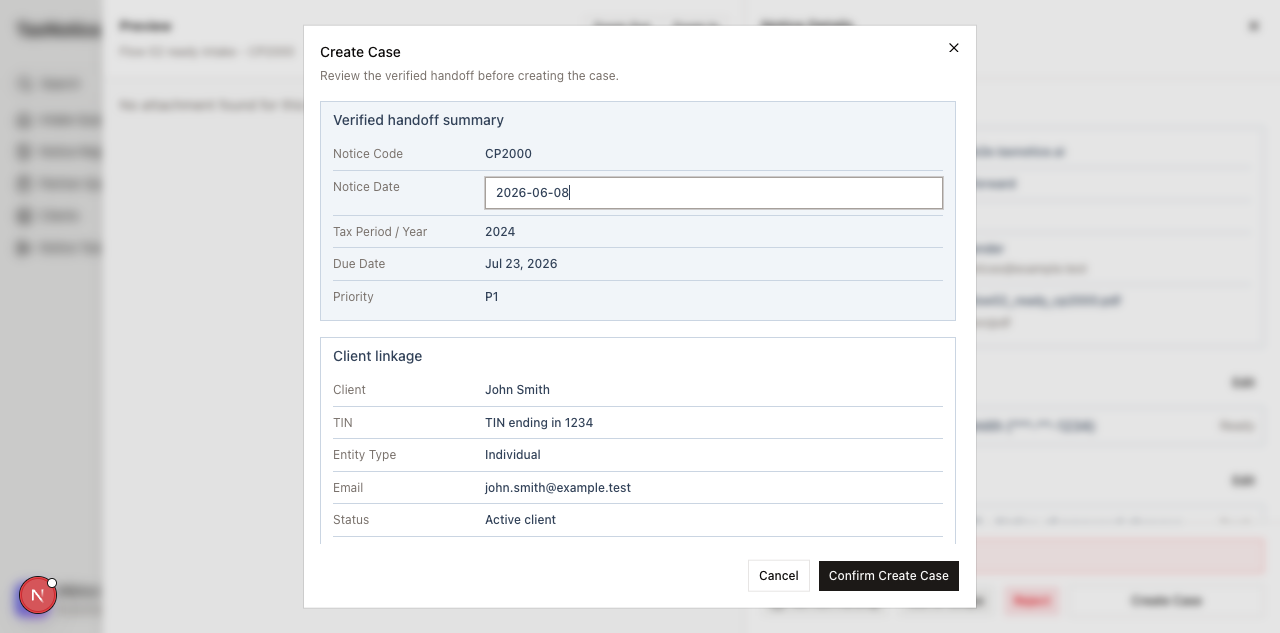
Click Create Case in the sheet footer. The confirmation dialog opens with the prompt Review the verified handoff before creating the case. If the button is still disabled, finish the blocker listed in the sheet first instead of trying to work around it here.
Review the verified handoff summary
In Verified handoff summary, confirm the fields that will seed the case: Notice Code, Notice Date, Tax Period / Year, Due Date, and Priority. If the notice does not carry a response deadline, the dialog says No T-minus response reminders will be created and shows the notice's Recommended action instead.
Confirm the client and assignees
In Client linkage, verify the client name, TIN ending, Entity Type, email, and current status. Then check the assignment cards for Owner preparer and Reviewing partner. The case should not be created under the wrong client or without the right people attached to it.
Finish the handoff and open the case
Click Confirm Create Case. After a successful handoff, the sheet shows Case was created from this intake., the new case number, Intake converted, and Notification status, plus links for Open Case, Open Files Checklist, and Return to Intake. If the request is interrupted, the dialog can surface Retry safely and Check existing case so you can confirm the outcome without guessing.
What happens next
Open Case takes you to the case Overview, where the case number, client, notice code, partner, and verified intake snapshot are already in place. Open Files Checklist jumps straight to the evidence work. The original notice is already on file, the notice-specific checklist is seeded, and any missing POA or supporting documents stay visible as drafting blockers until your firm clears them. Continue with Gather evidence, Clients, or Deadlines and triage when you need the next operational step.
FAQ
Why is Create Case disabled? The intake still has a blocker. In the current flow, unresolved client matching, a missing owner preparer, or a missing reviewing partner will keep the handoff blocked until you fix them in the intake sheet.
What if I notice the notice date is wrong in the dialog? The dialog treats that as a material change. When the notice date no longer matches the reviewed intake, the handoff switches to Return to Intake Review so the notice facts can be checked again before the case is created.
Does missing POA or evidence stop case creation? No. The case can still be created, and the checklist is seeded right away. Those missing items show up in the case workspace and keep drafting locked until they're resolved.
What if the confirmation times out or my connection drops? TaxNotice.ai keeps the recovery options inside the handoff. Use Retry safely or Check existing case to confirm whether the case already exists before you click again.