IRS notice follow up after response and closeout
Track IRS notice follow up after response: monitor silence, log IRS contacts and replies, start a second submission when needed, and close the case cleanly.
Last updated 2026-06-24
IRS notice follow up after response starts once your firm has sent the response package and logged delivery proof. TaxNotice.ai keeps the case visible in Notice Register, shows the next check, and gives your team one place to log follow-up attempts, record an IRS reply, start a second submission, and close the work with an outcome. The software tracks the work; your firm still decides the tax position and the next step.
Before you start
This guide begins after Log delivery proof. Case Preparers work the day-to-day monitoring in the case's Follow-up tab. Case Administrators watch the register and own terminal closeout in the standard MVP path.
TaxNotice.ai tracks the work, not the IRS
TaxNotice.ai cannot make the IRS answer sooner or decide the outcome for your firm. It keeps silence, follow-up attempts, and closeout evidence visible so the case does not disappear after delivery.
Steps
Review follow-up workload in Notice Register
Open Notice Register. The table shows sent cases with Case, Client, Notice, Risk, Dates, Assignees, Delivery Proof, and Follow-up side by side. Use it to spot the difference between Awaiting IRS Response, IRS silence escalated, Monitoring suspended pending taxpayer action, Action Required, and Sent to IRS. The Follow-up column also keeps the active signals separate: Intake escalation, IRS silence, Risk checkpoint, Deadline proximity, and Suspended.
Open the case and move to the Follow-up tab
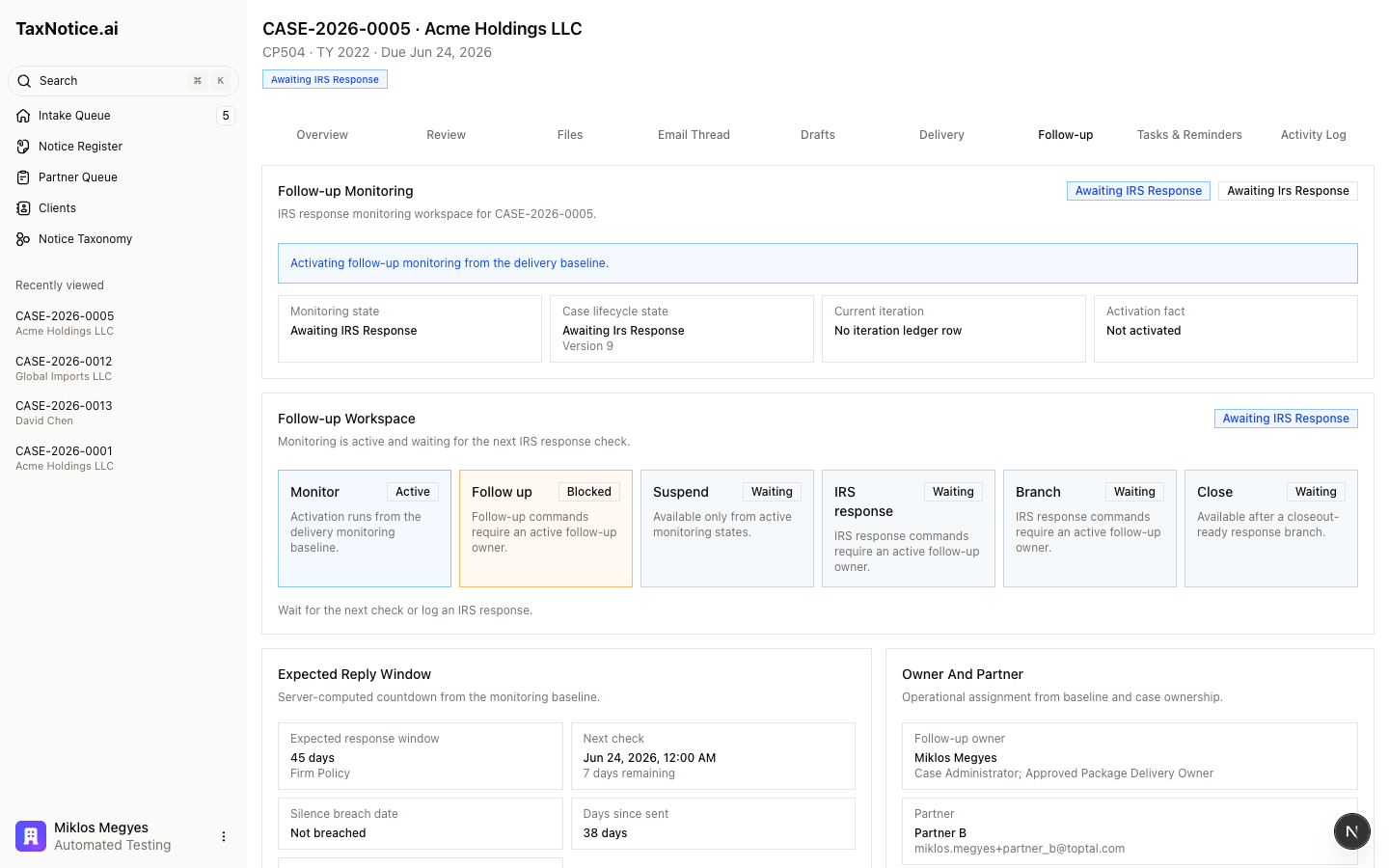
Click the case from Notice Register, then open Follow-up. The workspace brings the post-send facts into one view: Follow-up Workspace, Expected Reply Window, Owner And Partner, Iteration Timeline, Monitoring Signals, Send Facts, and Closeout. On an active case you will usually see Log Follow-up, Suspend Monitoring, Log IRS Response, and Start Second Submission.
Keep monitoring active until the facts change
While the case is waiting, watch Next check, Silence breach date, Days since sent, and the delivery proof reference. If the IRS is simply still working, leave the case in Awaiting IRS Response. If the IRS is waiting on the taxpayer rather than the firm, use Reason, Responsible party, Next review date, and Suspend Monitoring so the case stays visible without pretending the IRS is late.
Log every follow-up attempt and every IRS reply
When your team calls the IRS or sends another touchpoint, click Log Follow-up. Choose the Follow-up method, enter the Call date and time or Sent date, and save the method-specific proof. When the IRS replies, click Log IRS Response and capture the Response type, Received date, Summary, and any next deadline or reference.
Route the case to the right next branch
After a reply is recorded, use Route IRS Response. Agreement / Resolved moves the case toward closeout. Needs More Time / Pending resets monitoring. Needs More Information / Documents Requested sends the work back into Gather evidence and Draft the response package. Disagreement / Rejection opens a strategy path that can require Partner review.
Start a second submission or close the case
If the IRS never received or processed the package, use Start Second Submission. The workspace preserves Sent #1 and starts the next iteration instead of overwriting the first delivery record. When the response is truly resolved, the Case Administrator uses Close Case to record the Close type, Outcome, Final notes, and Final client summary disposition. If the client was notified outside the app, closeout also requires the method, date, and explanation. After closeout, ordinary workflow actions are read-only; use Post-close Activity for Tier 1 notes or Formal Reopen when the firm needs a new active cycle.
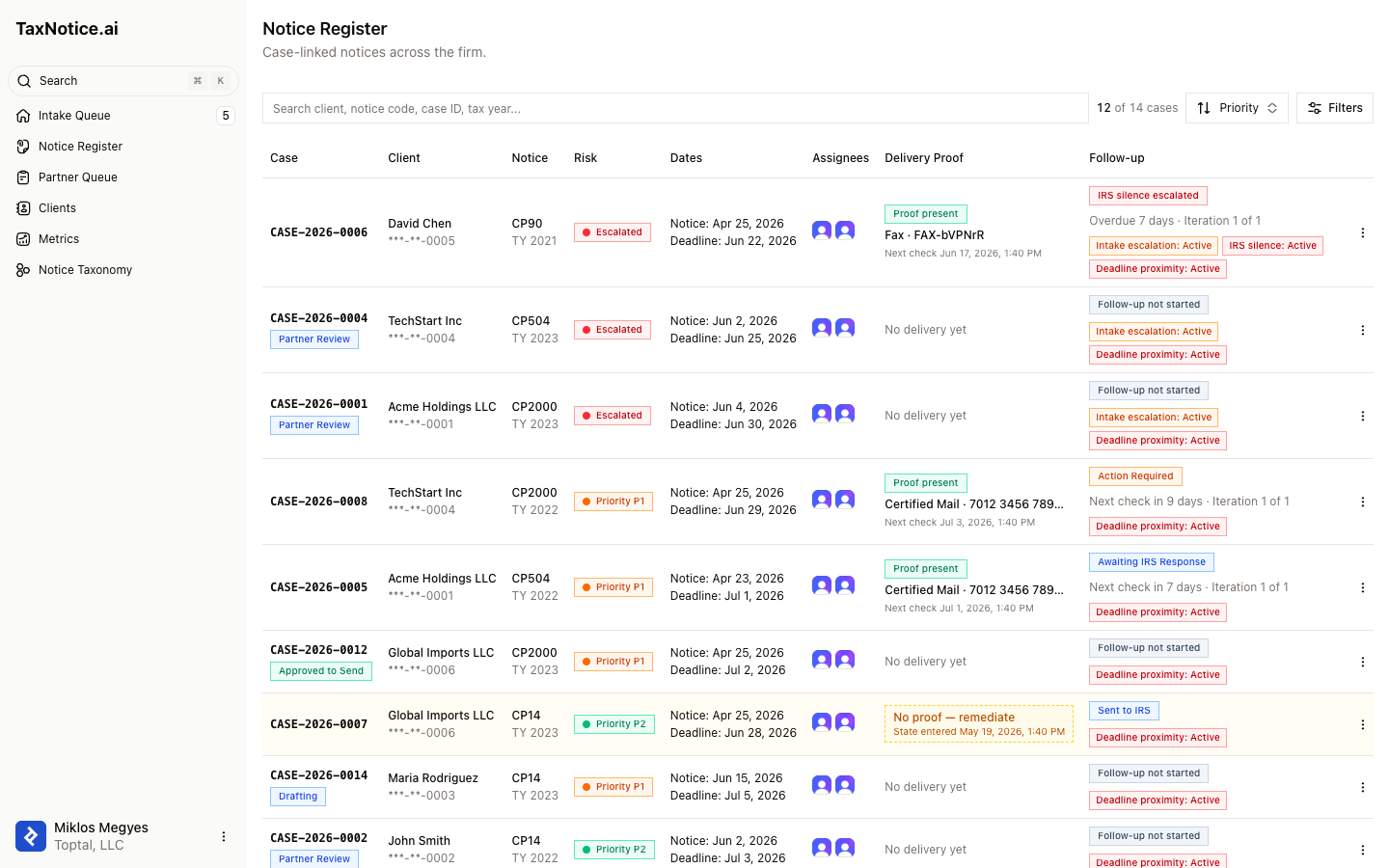
The register is where Case Administrators see whether the firm is still waiting, overdue for follow-up, paused for taxpayer action, or back in an action-required loop.
What happens next
After you route the IRS reply, the case either returns to monitoring, loops back into more response work, or becomes ready for terminal closeout. Once it is closed, active monitoring and ordinary follow-up stop, but Notice Register and the case history still preserve the sent proof, every follow-up attempt, the IRS reply, and the final outcome. If the matter reopens, the original closed cycle remains historical and the reopened work starts as its own active cycle.
FAQ
What is the difference between Awaiting IRS Response and IRS silence escalated? Awaiting IRS Response means the next check is still in the future. IRS silence escalated means the expected reply window has passed and the case needs a documented follow-up.
Should I put a phone call in notes only? No. Use Log Follow-up so the method, date, proof, and reset window stay attached to the case instead of disappearing into free text.
When do I use Start Second Submission instead of Log Follow-up? Use Log Follow-up for an IRS call, fax, or mail touchpoint tied to the current send. Use Start Second Submission when the IRS did not receive or process the package and your firm needs a new send iteration.
Why is Close Case still unavailable? Closeout does not finish from silence alone. The case must reach a closeout-ready response branch, and the Case Administrator still has to complete outcome evidence, final notes, and the final client summary disposition.
Can I add anything after a case is closed? Ordinary workflow actions stay read-only. Use Post-close Activity for append-only Tier 1 notes, or Formal Reopen when the firm needs to restart active work.