IRS notice task queue
Use the IRS notice task queue in TaxNotice.ai to review deadline reminders, follow-up risk, blockers, owners, and case destinations before work slips.
Last updated 2026-06-28
The IRS notice task queue in TaxNotice.ai gives your firm one place to review active deadline reminders, follow-up checks, blockers, owners, and the case destination for each next step. It keeps the work visible without asking staff to decide from memory which case tab owns the action.
Before you start
Open Tasks from the main navigation. Case Administrators can review firm-wide work. Case Preparers use the queue to see assigned work and complete reminders they own. Partners can supervise deadline and follow-up pressure without taking over operational closeout.
Completing a reminder is not the same as closing a case
A simple deadline reminder can be marked complete when your firm has handled that reminder. It does not close the case, approve a response, log delivery proof, or resolve IRS follow-up. Workflow-owned rows route you to the case tab that owns the controlled action.
Steps
Open Tasks and choose a scope
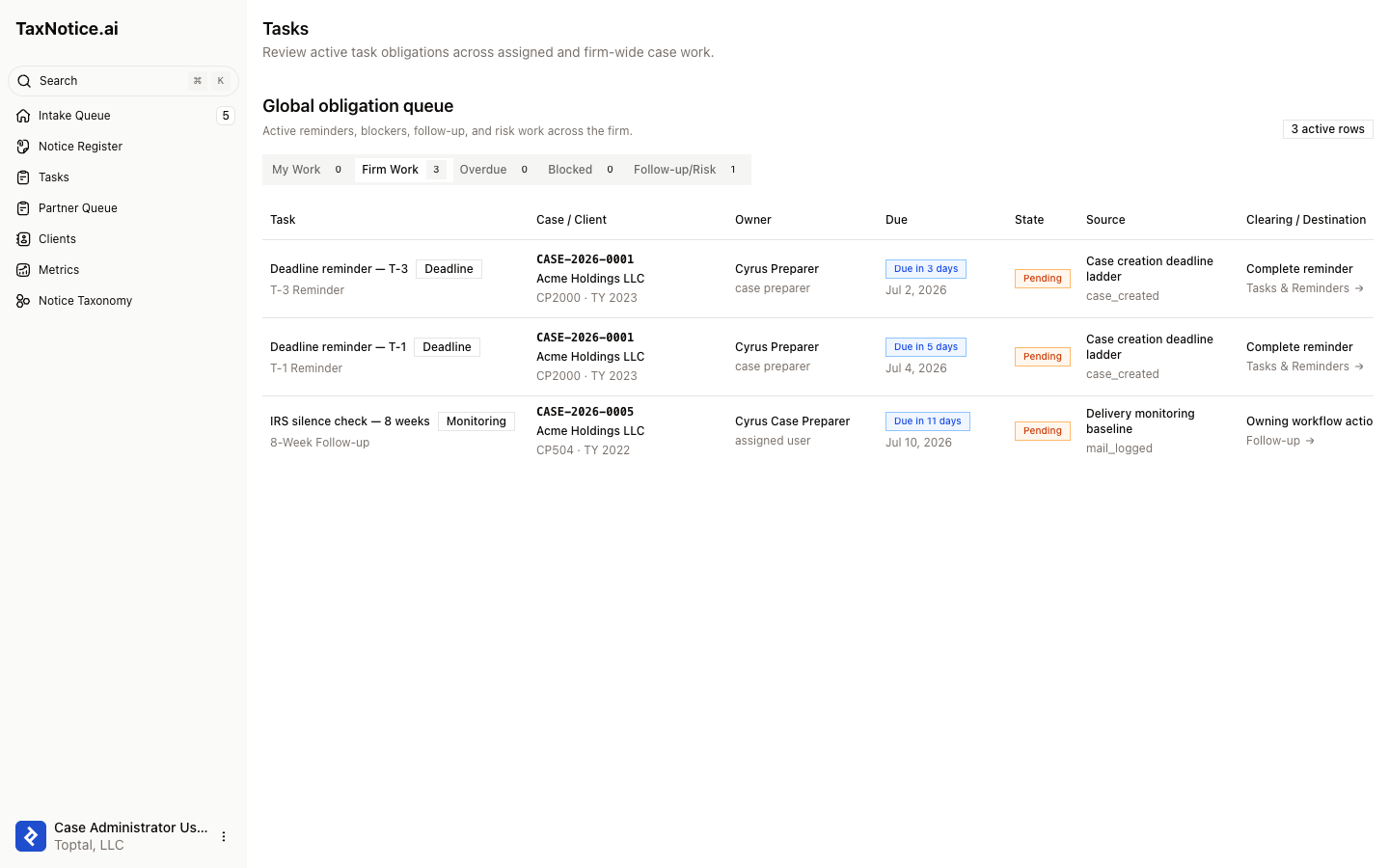
Select Tasks in the sidebar. Use My Work for your assigned rows, Firm Work for the active firm queue, Overdue for missed due dates, Blocked for rows that need another case step first, and Follow-up/Risk for post-delivery or risk-checkpoint work.
Read the row before acting
Each row shows the Task, Case / Client, Owner, Due, State, Source, Clearing / Destination, and Consequence. This tells you whether the row is a deadline reminder, a monitoring check, or work that belongs to a case workflow such as Follow-up.
Complete simple reminders with a note
For rows that show Complete reminder, click Complete and add the completion note the dialog asks for. The queue records the reminder as handled and refreshes in place, while later deadline rows still depend on the case deadline until valid delivery proof stops open reminders.
Route workflow-owned rows to the case tab
Rows that show Owning workflow action should not be cleared from the queue directly. Click Open or the destination link, then work in the case tab named by the row, such as Tasks & Reminders or Follow-up.
Check the case-local history
When you need the case record, open Tasks & Reminders inside the case workspace. Active rows and completed history stay together there, so the team can see which reminders were handled and which workflow actions are still open.
What happens next
Completing a simple reminder removes that row from active queue scopes and leaves the handled record in the case's Tasks & Reminders history. Opening a workflow-owned row takes you to the case tab that owns the real next action. Use Create a case from intake to see how deadline reminders are seeded, Delivery to see when pre-deadline reminders stop, and Follow up and close the case for IRS silence, response, and closeout work. For the operating model behind deadline pressure, see IRS notice response deadlines and triage.
FAQ
Why do some rows have Complete and others have Open? Simple reminder rows can be marked handled from the queue. Rows tied to delivery, follow-up, evidence, drafting, review, or closeout route to the case tab that owns the action.
Can a partner complete operational tasks from this queue? Partners can review the work and open the case context. Routine reminder completion and closeout stay with the role that owns that operational action unless your firm expands permissions.
Does completing a deadline reminder stop future reminders? No. A handled reminder is recorded, but later deadline reminders remain active until the case's response deadline changes or valid delivery proof stops the pre-deadline ladder.
Does TaxNotice.ai decide the IRS response strategy from this queue? No. The queue shows owners, deadlines, and destinations. Your firm reviews the facts, decides the position, and approves the final response.
See notice task work before it slips
TaxNotice.ai is opening to a small group of founding firms before launch. Request founding firm access to see deadline reminders and follow-up work in one queue.