IRS delivery proof and follow up
Understand IRS delivery proof and follow up in TaxNotice.ai: log mail, fax, or phone proof, monitor the IRS response, and close the case cleanly.
Last updated 2026-06-24
IRS delivery proof and follow up is the part of notice work that starts after a response is approved. Your team sends the final package, records what proves it was sent, and keeps the case visible until the IRS answers or the matter is closed. In TaxNotice.ai, the proof, the next check, the follow-up owner, and the final outcome all stay attached to the case instead of disappearing into inboxes, downloads folders, and calendar reminders.
TaxNotice.ai records the work; your firm still does it
Your team still mails, faxes, or makes the IRS call. TaxNotice.ai records the proof, shows the next follow-up step, and keeps the audit trail visible. It does not send IRS responses automatically or decide the outcome for your firm.
What it is
Delivery proof is the record that shows what your firm actually did once an approved response was ready to go out. In TaxNotice.ai, that proof is method-specific:
- Certified Mail with the sent date and USPS tracking number
- Fax with the sent date and confirmation reference
- Phone Call with the contact date, outcome, and notes
That distinction matters because approval and delivery are not the same thing. A case can be approved and still not be sent. It becomes sent only when your team logs real proof from the channel it used.
Follow up starts after that proof is accepted. The work shifts from "we approved the package" to "we sent it, now we need to watch for the IRS response." From there, the case can move into ordinary monitoring, a follow-up contact, IRS response handling, another submission, or close the case work.
Why it matters
This is where many firms lose operational control. A package gets mailed, but nobody can find the tracking number later. A fax confirmation lives in one person's downloads folder. Someone remembers calling the IRS, but nobody knows what was said, when it happened, or when to call back. Or the IRS answers, the team handles it, and the case still never gets formally closed.
TaxNotice.ai keeps those gaps visible instead of letting them blur together:
- delivery proof shows whether the response was sent and how it was sent
- post-send monitoring shows whether the case is simply waiting, overdue for a response, or paused
- response handling keeps the next action tied to the case when the IRS asks for more time, more information, or a different response
- close-the-case controls keep the final outcome and client summary from becoming an afterthought
That means your firm can answer the questions that matter under review: what was sent, when it went out, what proof exists, what the IRS did next, and whether the case is actually finished.
How it works in TaxNotice.ai
The Delivery tab is where the case crosses from an approved package to a sent response. In the live workspace, the Guided Log Delivery panel breaks that handoff into plain operational steps: Package access, Proof validation, Post-Send Monitoring, and Correction path. That keeps approval, proof, and monitoring separate instead of treating them like one click.
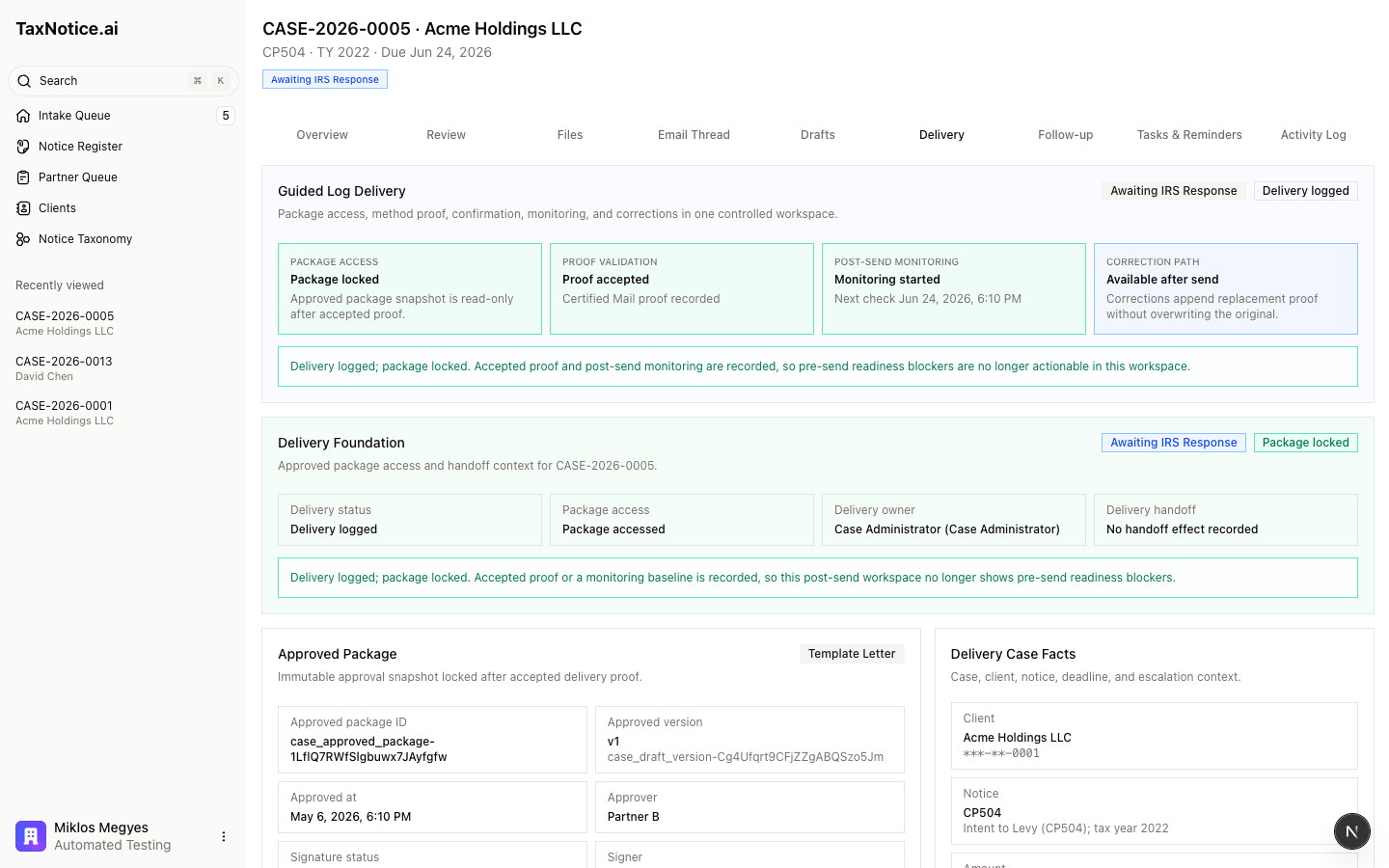
On a sent case, the same tab shows the accepted proof, the current case status, and the first monitoring handoff together. In the captured example, the case shows Awaiting IRS Response and Delivery logged, with Certified Mail proof accepted and monitoring already started. The details below keep the practical facts close at hand: client, notice, deadline, approved package snapshot, and the delivery method your team used.
When proof is accepted, TaxNotice.ai records the case as sent, stops the pre-deadline reminder rhythm, and starts the first response check. If a proof record later needs correction, the original entry stays in history and the replacement is logged beside it, so the firm can still show what was recorded first and what changed.
What happens after delivery
Once proof is logged, the Follow-up tab becomes the monitoring workspace. In the live product, that tab is built around the labels your team needs under pressure: Follow-up Monitoring, Log Follow-up, Log IRS Response, Route IRS Response, and Close Case.
Those controls answer the practical post-send questions:
- Are we still waiting on the IRS?
- Is a follow-up call or second submission needed?
- Did the IRS respond with agreement, more time, more information, or rejection?
- Can the case be closed, or does another round of work need to start?
The case can stay in Awaiting IRS Response, move into an overdue follow-up posture when the response window passes, pause when the IRS is waiting on taxpayer action, or return to earlier work if the IRS asks for more documents or another submission. When the IRS does answer, your team logs the response, routes the next step, and closes the case with the outcome and client summary recorded in the same place as the original send proof.
That is what makes delivery proof and follow up one continuous control surface rather than two disconnected chores. Your team sends the approved package, records proof, watches the next check, handles what the IRS sends back, and closes the case with the full history still intact.
Related
- Deliver an approved response
- Follow up and close the case
- IRS notice response packages
- IRS notice response deadlines and triage
See delivery proof and follow-up on a live case
TaxNotice.ai is opening to a small group of founding firms before launch. Request founding firm access to see delivery proof, monitoring, and closeout in one case workspace.