Log IRS notice delivery proof
Log IRS notice delivery proof after approval: download the approved package, record mail, fax, or phone proof, and start follow-up after send.
Last updated 2026-06-24
IRS notice delivery proof is the handoff between approval and follow-up. In TaxNotice.ai, your firm still mails, faxes, or calls the IRS outside the app, then records the proof that shows what was sent, when it was sent, and which approved package it came from. The software locks the approved package, captures the audit trail, and starts the next check only after a person confirms the proof.
Before you start
Open a case that already shows Approved to Send, then choose the Delivery tab in the case workspace. In the current live workflow, proof entry stays locked until partner approval is done, a signed approved package exists, the final package reference is available, and a Case Administrator records package access.
Your firm still controls the send
TaxNotice.ai does not deliver an IRS notice for you. Your firm sends the approved package outside the app, then records the delivery proof and the follow-up handoff here.
Steps
Open the case and choose Delivery
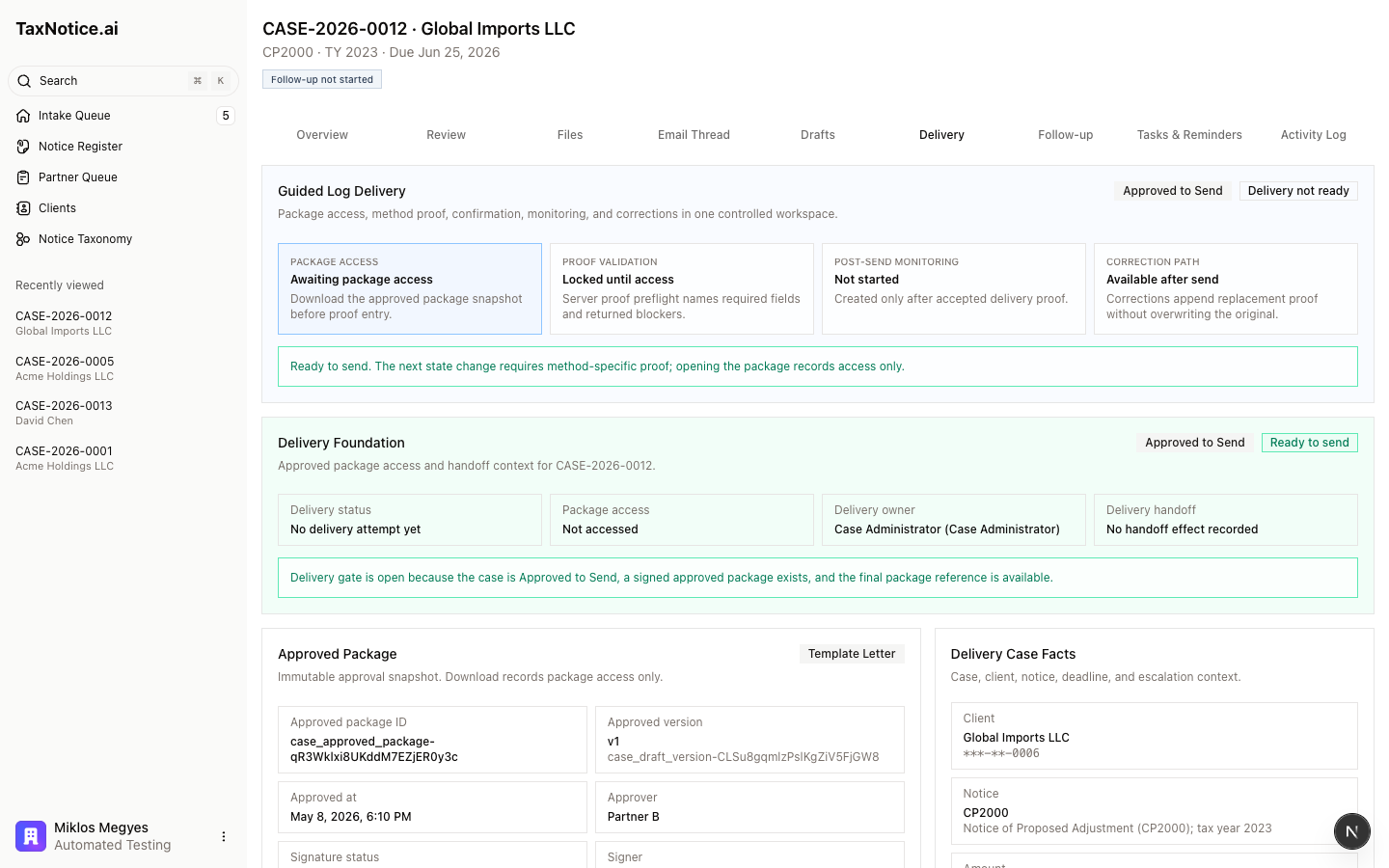
In the case workspace, select Delivery from the tab row. The tab opens in four parts: Guided Log Delivery, Delivery Foundation, Approved Package, and Delivery Case Facts. The header badges tell you whether the case is Approved to Send, Ready to send, or still blocked.
Confirm the delivery gate is open
Read Delivery Foundation before you send anything. It shows Delivery status, Package access, Delivery owner, and Delivery handoff, plus either a green gate-open message or a Delivery gate blockers list. If the case is not yet approved, or the approved package snapshot is missing, stop here and finish Partner review & approval.
Download the approved package
In Approved Package, review the approval facts: Approved package ID, Approved version, Approved at, Approver, Signature status, Signer, and the Typed signature line. Then click Download Approved Package. That records package access only - it does not mark the case sent - and it unlocks proof entry for the current attempt.
Send the package and enter method-specific proof
After your firm sends the package outside the app, complete Delivery Method & Proof. The method list uses the live labels Certified Mail (recommended), Fax, and Phone Call, and the Proof requirements box updates with the required fields for the method you pick: Sent date plus USPS tracking number for Certified Mail, Sent date plus Fax confirmation reference for Fax, or Call date and time, Outcome, and Call notes for a Phone Call. The fax form also gives you Success-page reference for the receipt your firm stores elsewhere.
Review the summary and log the proof
Check Review Delivery Summary before you submit. It restates Method, Sent/contact date, and Proof reference. When those match what your firm actually mailed, faxed, or completed by phone, click Log Delivery Proof. That is the send event: the case is marked sent from this proof record, not from the package download.
Use the logged state for audit and follow-up
After save, the proof card changes to Delivery Proof Logged and the post-send panel appears. Post-Send Status shows reminder cancellation, internal and client notification status, the monitoring handoff, and the next check date. If a tracking number or fax confirmation was wrong, use Correct Delivery Proof so the replacement proof is appended without erasing the original record. Attempts And Correction History keeps the package access, proof, and correction sequence together for later review.
What happens next
When you log proof, the case moves out of approval and into the sent state. The Delivery tab shows the logged method and proof, cancels the pre-deadline reminders, queues the internal and client notifications, and starts the post-send monitoring timer with a visible Next check. From there, your firm works the next stage in Follow up & close the case. For the operating model behind the proof record and monitoring handoff, see Delivery proof & IRS follow-up. If you need to confirm how the approved package was created, go back to Partner review & approval.
FAQ
Does downloading the approved package mark the case sent? No. Download Approved Package records package access and unlocks proof entry. The send event happens only when a Case Administrator submits Log Delivery Proof.
What proof is required for each method? Certified Mail requires Sent date and USPS tracking number. Fax requires Sent date and Fax confirmation reference. Phone Call requires Call date and time, Outcome, and Call notes. The Proof requirements panel shows the current method's required and optional fields before you submit.
Why is the proof form still locked? The case must already be Approved to Send, the approved package snapshot must exist, and package access must be recorded first. In the current live UI, package access and proof entry are opened by a Case Administrator.
What if the wrong tracking number or fax confirmation was logged? Use Correct Delivery Proof from the logged proof state. TaxNotice.ai preserves the original proof in correction history and adds the replacement proof as an auditable update.
Where can I see who opened the approved package? The Delivery tab records package access before proof entry and carries it into the delivery history, so the send attempt shows both the approved package access and the proof that moved the case forward.