IRS Power of Attorney (Form 2848)
See when an IRS power of attorney Form 2848 is required, why missing or expired POA blocks drafting, and how TaxNotice.ai keeps it visible.
Last updated 2026-06-18
If your firm is looking up Form 2848 power of attorney IRS requirements, the practical question is whether you can act for the client yet. In TaxNotice.ai, a required Power of Attorney (Form 2848) is a visible readiness gate: the case can exist, evidence work can continue, and the team can see exactly what is missing, but Draft Response stays locked until the signed form is on file and your firm records it.
What it is
Form 2848 is the IRS power of attorney form that lets a representative act for a taxpayer in the situations the IRS allows. In TaxNotice.ai, that form is not treated as just another supporting document. It is the authorization record the case needs before your firm can move from gathering evidence into a response that goes out on the client's behalf.
That distinction matters because a case can still be active while POA is unresolved. Your team may already have the original notice, request other documents, and review the facts, while the POA remains the one visible item keeping the case from being ready to draft.
Why it matters
When POA tracking lives in inboxes, shared drives, or memory, the risk is not only wasted time. The bigger risk is that staff assume the firm is cleared to act when the signed form is still missing, expired, or never verified for the current case.
TaxNotice.ai keeps that gap obvious. The case keeps showing the POA status, the evidence checklist, and the drafting gate until the form is handled. That gives preparers a clear next step, gives partners a reliable read on readiness, and keeps authorization work from disappearing into side conversations.
Just as important, TaxNotice.ai does not create legal authority by itself. The client signs the form. Your firm verifies it, records where it lives, and decides when the case can move forward. The software tracks the gate and the recordkeeping; it does not make the tax decision or stand in for firm judgment.
How it works in TaxNotice.ai
When a notice type requires POA, the case workspace keeps that requirement visible across the places your team actually works. In the Files tab, the checklist shows Form 2848 (Power of Attorney) as a critical item with a blocked status, alongside any other missing or requested evidence. The same tab keeps the next actions close by with Request POA and Record Case POA controls, so the authorization gap is actionable instead of easy to miss.
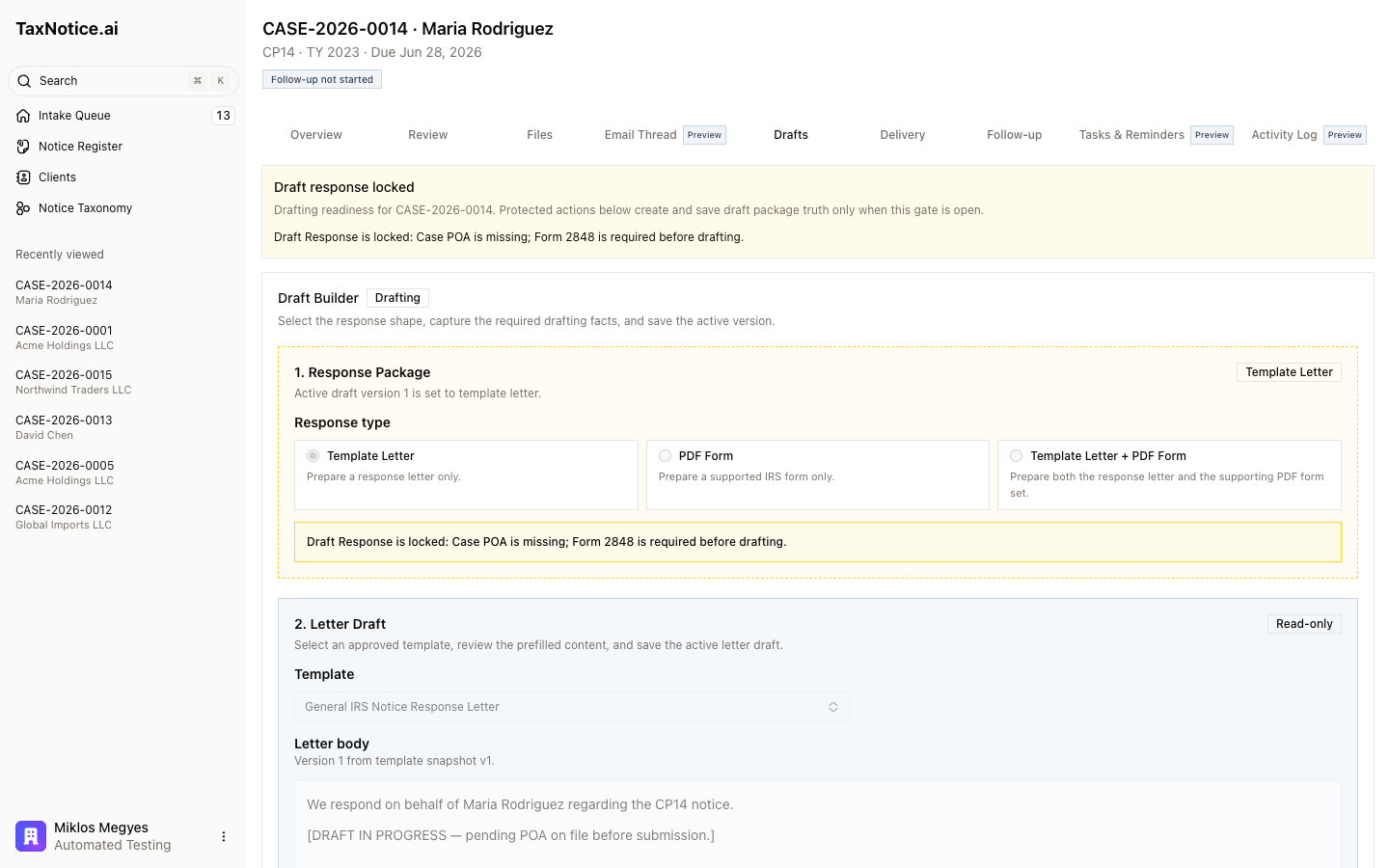
The same case stays visibly gated in Drafts. In the Maria Rodriguez example, the drafting workspace shows the blocker in plain language: Case POA is missing; Form 2848 is required before drafting. If the POA is missing, expired, or still unknown, that gap stays visible instead of silently clearing because another document was received.
When the signed form comes back, the preparer records a locator and a verification note for that case. That is what opens the gate. TaxNotice.ai helps detect the need, prefill Form 2848 from case data, and track the handoff, but your firm's people are still the ones confirming that the authorization is real and usable.
Related
- Understand the evidence checklist
- See how cases, notices, and clients stay connected
- Gather evidence and request missing documents
- Draft a response package
See how POA tracking looks in a real case
TaxNotice.ai is opening to a small group of founding firms before launch. Request founding firm access to see the POA gate, evidence checklist, and drafting handoff in your own notice workflow.